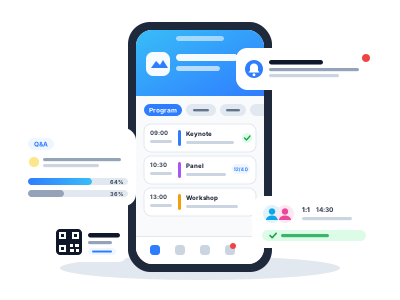
Event Web App is a web application of your event that attendees open in their phone browser, with no store download. It holds the programme, speakers, partners, news and practical information. With the QR code on their ticket they activate a profile and then register for sessions, ask speakers questions, vote in polls and arrange meetings with other attendees.
The whole event in one link
An intro with date and venue, the programme by day and room, speaker profiles with photos, partner logos, news and an Information section with instructions and FAQs. The programme and speakers come from the Agenda you already keep in Inviton, so nothing is entered twice. Whatever an attendee has loaded stays available when the venue Wi-Fi drops.Profile via the QR code on the ticket
The QR code on the ticket or badge opens the web app right on the attendee profile. After verifying with a code from their e-mail, attendees add a photo, bio, company and contacts and decide whether to appear in the attendee directory. The same QR code still serves for check-in at the entrance.Engagement and networking
Questions for speakers and polls during sessions, registration for sessions with limited capacity including a waiting list, and a personal programme for every attendee. For 1:1 meetings you set the times and tables, attendees then propose meetings to each other and save a colleague's card with a private note by scanning their badge. News you add in the admin appears to attendees instantly as a notification and stays in the notification history.A look that matches your event
Five visual templates, your own logo, hero image and primary colour. Enable only the sections you need and publish once the content is ready. The programme, speakers and partners including images can also be filled by a one-off import from a prepared file.Ideal solution for
- Conferences and congresses
- Corporate events and trainings
- Trade shows and networking events
- Festivals with a programme on several stages
Benefits of the Event Web App
- No install, it opens from the QR code on the ticket
- Programme and speakers straight from the Agenda, no double work
- Questions, polls and 1:1 meetings raise engagement
- News reaches attendees instantly
- Five visual templates, your own logo and colours
- Works alongside the native mobile app, sharing its content
How it works
-
1
Turn on the web app
You find it in the event administration.
-
2
Choose the design and sections
One of five templates, and what the attendee should see.
-
3
Turn on the Smart QR code
The QR code on the ticket then opens the attendee's profile.
-
4
Publish and send news
Attendees see it right away.
How it helps you
-
No install, it opens from a QR code
-
Attendees always have the programme at hand
-
News shows up instantly
-
More engagement during the event
Key features
-
Programme, speakers and news in the browser
-
Questions for speakers and polls
-
1:1 meetings between attendees
-
Five design templates
Explore More Features
New event in 15 minutes
Sell tickets online
Custom tickets graphic
Dynamic registration forms
Wallet tickets
Guest list for guests and partners
Email invitations
Discount codes
Inviton Scheduler
Marketplace for Secure Secondary Ticket Sales
Access control
Visitor check-in
On-site ticket sales
On-site print
Attendee signatures at your event
Face recognition check-in
Mobile apps
Visitor management
Open Cashless Solution
Audience interaction
Real-time reports
Certificates with credits
Inviton in ChatGPT
Want to try it at your event?
Join thousands of event organizers who trust Inviton for their events.